10 SDLC Controls UK Financial Firms Should Automate
UK financial services regulators are no longer satisfied with written policies and annual reviews. They expect evidence that controls are working, who owns them, and how quickly you can respond when something goes wrong. A unified software delivery compliance platform like LoopIQ helps you automate the evidence trail across testing, incidents, releases, and audits.
This article lists 10 SDLC controls you should automate to satisfy FCA expectations, operational resilience requirements, and audit demands. For each control, you will learn what to capture and how to verify it is working.
LoopIQ connects delivery work with compliance evidence in a single workspace, helping your engineering and compliance teams maintain audit-ready records without switching between disconnected tools.
Key Takeaways: 10 SDLC Controls UK Financial Firms Should Automate
- UK financial regulators expect proof that controls work, who owns them, and how fast you respond — written policies are no longer enough.
- Automate 10 SDLC controls spanning testing, incidents, releases, and access governance to meet regulatory expectations.
- Regulators verify controls through evidence requests: automated trails answer in minutes what manual processes answer in weeks.
- LoopIQ automates the evidence trail across testing, incidents, and releases for UK financial services compliance.
Quick guide: 10 SDLC controls for UK financial services compliance
- Release Certification Workflow: The best control for audit-ready release governance
- Code Review Approval Tracking: Records peer sign-off on every code change
- Incident-to-Audit Traceability: Links incidents to remediation and evidence
- Automated Security Scan Gates: Blocks deployments with unresolved vulnerabilities
- Change Approval Enforcement: Captures approver identity, timestamp, and rationale
- Testing Evidence Capture: Documents test coverage, pass rates, and failures
- Deployment Environment Validation: Confirms target environment readiness before release
- Rollback Decision Recording: Logs rollback triggers, decisions, and outcomes
- Third-Party Dependency Attestation: Verifies vendor controls before integration
- Evidence Archival and Retrieval: Maintains searchable compliance records
How we chose these SDLC controls
We selected these controls based on what UK financial regulators expect from software delivery teams. The FCA operational resilience requirements and PRA expectations shaped our criteria.
- Regulatory alignment: Each control maps to FCA, PRA, or DORA requirements so you can demonstrate compliance during supervisory reviews.
- Evidence quality: Controls must capture timestamped, attributable records that auditors can verify independently.
- Automation potential: We prioritised controls that can run without manual intervention, reducing the risk of missed steps or incomplete documentation.
- Incident response value: Controls should help you respond faster when disruptions occur, not just document processes after the fact.
- Cross-team visibility: Your compliance, engineering, and risk teams need access to the same evidence without chasing documents across systems.
- Scalability: Controls must work across multiple applications, environments, and teams without creating bottlenecks.
The 10 SDLC controls UK financial firms should automate
1. Release Certification Workflow: Best overall control for UK financial compliance
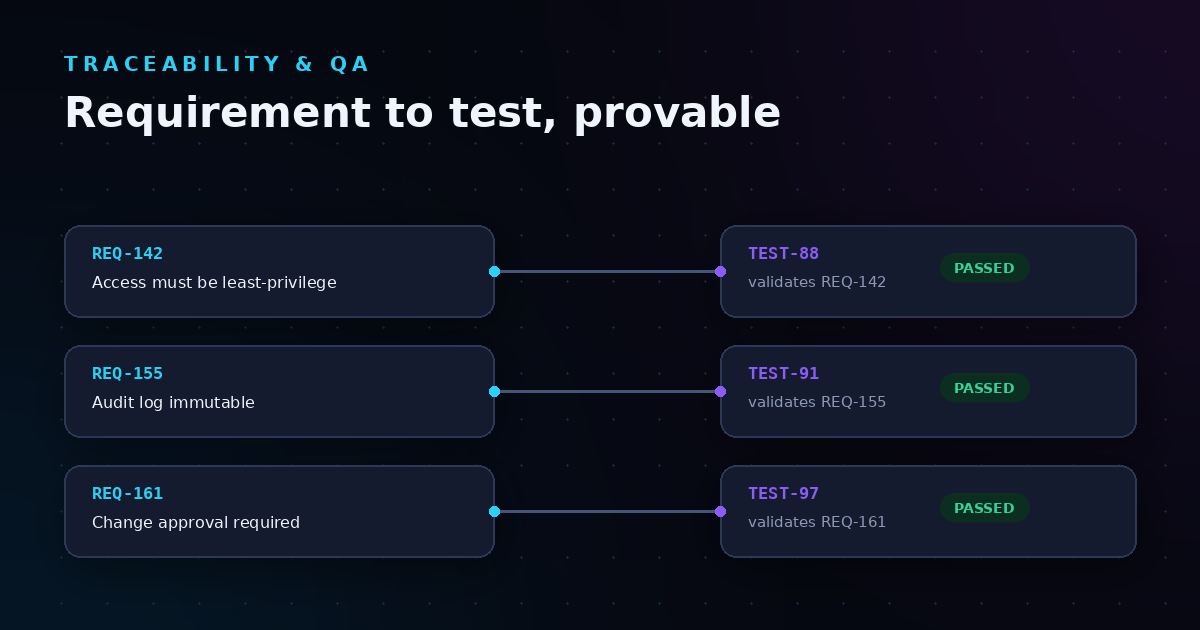
Release certification workflows capture every approval, test result, and sign-off required before code reaches production. For UK financial firms, this control creates the audit trail regulators expect when they ask how you govern software changes. LoopIQ automates this workflow by linking release tickets to test outcomes, security scans, and approval records in one place.
Without automated certification, your teams spend hours gathering evidence from scattered systems before each release. This slows delivery and increases the risk of missing critical sign-offs. LoopIQ captures certification evidence as work happens, so your release managers can verify readiness without manual checklists.
LoopIQ features
- Automated approval routing: LoopIQ sends certification requests to the right approvers based on change type, risk level, and team ownership, eliminating manual handoffs.
- Evidence aggregation: Test results, security scan outputs, and peer review approvals flow automatically into the release record, creating a single source of truth.
- Compliance score tracking: LoopIQ calculates release readiness scores based on control completion, helping you identify gaps before deployment.
- Audit-ready export: You can generate certification reports in formats auditors recognise, reducing preparation time during regulatory reviews.
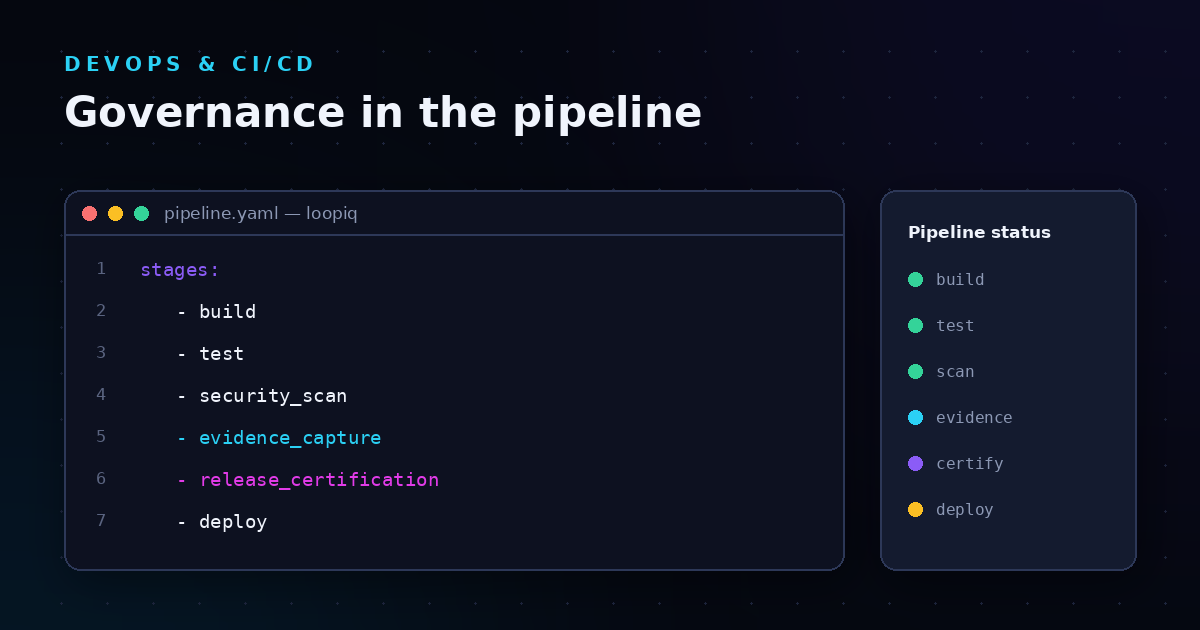
- Integration with existing pipelines: LoopIQ connects to your CI/CD tools, pulling deployment data into the certification workflow without requiring engineers to change their processes.
LoopIQ pros and cons
Pros:
- LoopIQ unifies release governance across testing, approvals, and audit evidence in a single workspace
- LoopIQ captures compliance signals automatically as work happens, not as a separate manual task
- LoopIQ supports both DevOps velocity and regulatory accountability without forcing teams to choose between them
Cons:
- Initial setup requires mapping your existing approval workflows to LoopIQ's certification framework
- Teams accustomed to spreadsheet-based tracking may need time to adopt the unified workspace approach
- Full value emerges when connected to multiple SDLC stages rather than used for certification alone
2. Code Review Approval Tracking: Records peer sign-off on every change
Code review approval tracking captures who reviewed each change, when they approved it, and what they verified. This control helps you demonstrate that code does not reach production without qualified review.
Manual review tracking often relies on comments or tickets that can be overlooked or lost. Automated tracking creates immutable records linked directly to the code change itself.
Code review tracking features
- Reviewer identity capture: Records the name, role, and timestamp of each approver for audit purposes.
- Approval criteria enforcement: Blocks merges until required reviewers have signed off based on code ownership rules.
- Historical search: Enables quick retrieval of past review decisions during incident investigations or audits.
Code review tracking pros and cons
Pros:
- Captures approval evidence at the moment of decision
- Reduces manual documentation burden on developers
- Supports traceability from code change to production deployment
Cons:
- Requires integration with your version control system
- Review criteria must be defined and maintained as teams change
- Does not replace the need for skilled reviewers who understand the code
3. Incident-to-Audit Traceability: Links incidents to remediation and evidence
Incident-to-audit traceability connects operational incidents to the fixes, tests, and approvals that resolved them. UK regulators expect you to show how incidents were identified, escalated, and closed with appropriate controls.
When incidents happen, fragmented tooling makes it difficult to prove your response was adequate. Automated traceability links incident tickets to code changes, test results, and deployment records.
Incident traceability features
- Incident-to-change linking: Automatically associates incident records with the code changes deployed to resolve them.
- Timeline reconstruction: Creates a chronological view of detection, response, and resolution for regulatory reporting.
- Evidence attachment: Allows teams to attach supporting documentation directly to incident records.
Incident traceability pros and cons
Pros:
- Reduces time spent reconstructing incident timelines during audits
- Connects response actions to verifiable evidence
- Helps identify patterns across related incidents
Cons:
- Requires discipline in linking incidents to changes at the time of resolution
- Cross-system integration may be needed for full traceability
- Historical incidents without linked records remain difficult to audit
4. Automated Security Scan Gates: Blocks deployments with unresolved vulnerabilities
Security scan gates prevent code with known vulnerabilities from reaching production. These gates run automated checks and block deployments when findings exceed your risk thresholds.
Manual security reviews cannot keep pace with modern deployment frequency. Automated gates catch issues earlier and create evidence that security was verified before release.
Security scan gate features
- Pipeline integration: Runs security scans as part of your build process without requiring separate manual steps.
- Threshold enforcement: Blocks deployments when vulnerability counts or severity levels exceed defined limits.
- Finding attribution: Links vulnerabilities to specific code changes and responsible developers.
Security scan gate pros and cons
Pros:
- Catches vulnerabilities before they reach production
- Creates audit evidence of security verification
- Reduces reliance on manual security review processes
Cons:
- False positives may slow deployments if thresholds are too strict
- Requires tuning to balance security with delivery velocity
- Does not replace the need for security expertise in addressing findings
5. Change Approval Enforcement: Captures approver identity, timestamp, and rationale
Change approval enforcement records who approved each production change, when they approved it, and why. This control satisfies FCA incident reporting expectations that require clear accountability for changes.
Without automated enforcement, approvals can be bypassed or recorded inconsistently. Automated capture creates immutable records that auditors can trust.
Change approval features
- Mandatory approval gates: Prevents deployment without documented approval from authorised personnel.
- Rationale capture: Records the business or technical justification for each approved change.
- Escalation routing: Directs high-risk changes to appropriate approval levels automatically.
Change approval pros and cons
Pros:
- Creates complete audit trail of who approved what and when
- Enforces approval policies without manual oversight
- Reduces risk of unauthorised changes reaching production
Cons:
- Approval workflows must be configured to match organisational policies
- Overly complex approval chains may slow urgent changes
- Requires clear definition of approval authority and escalation paths
6. Testing Evidence Capture: Documents test coverage, pass rates, and failures
Testing evidence capture records what tests ran, which passed, which failed, and what coverage they achieved. This evidence supports your claim that releases were adequately tested before deployment.
Test results scattered across multiple tools make it difficult to answer basic questions during audits. Centralised capture creates a unified view of testing activity.
Testing evidence features
- Test result aggregation: Collects outcomes from unit, integration, and regression tests into a single record.
- Coverage reporting: Tracks code coverage metrics over time to identify testing gaps.
- Failure analysis: Links test failures to specific code changes and developers for faster resolution.
Testing evidence pros and cons
Pros:
- Demonstrates testing rigour to auditors and regulators
- Identifies coverage gaps before they cause production issues
- Supports root cause analysis when failures occur
Cons:
- Requires integration with testing frameworks and CI systems
- High test volume may generate large evidence datasets
- Coverage metrics alone do not guarantee test quality
7. Deployment Environment Validation: Confirms target environment readiness
Deployment environment validation checks that target environments meet required conditions before code is deployed. This control prevents releases to environments that are not properly configured or are experiencing issues.
Deploying to unprepared environments causes incidents that could have been avoided. Automated validation catches these problems before they affect users.
Environment validation features
- Pre-deployment checks: Verifies infrastructure, dependencies, and configuration before release.
- Health status monitoring: Confirms environment stability before allowing deployment to proceed.
- Validation evidence: Records what was checked and the results for audit purposes.
Environment validation pros and cons
Pros:
- Reduces deployment failures caused by environment issues
- Creates evidence that environments were verified before release
- Catches configuration drift before it causes incidents
Cons:
- Validation rules must be maintained as environments change
- Complex environments may require extensive check configurations
- Does not guarantee the application will function correctly after deployment
8. Rollback Decision Recording: Logs rollback triggers, decisions, and outcomes
Rollback decision recording captures when rollbacks are triggered, who authorised them, and what the outcome was. This control supports incident response by documenting recovery actions taken during disruptions.
Rollback decisions made under pressure are often poorly documented. Automated recording captures these decisions as they happen.
Rollback recording features
- Trigger logging: Records what condition or decision initiated the rollback.
- Authorisation capture: Documents who approved the rollback and when.
- Outcome tracking: Records whether the rollback succeeded and what state the system returned to.
Rollback recording pros and cons
Pros:
- Supports post-incident review and regulatory reporting
- Creates accountability for recovery decisions
- Helps identify patterns in rollback causes
Cons:
- Requires rollback processes to be integrated with recording systems
- Emergency rollbacks may initially bypass documentation
- Historical analysis depends on consistent recording practices
9. Third-Party Dependency Attestation: Verifies vendor controls before integration
Third-party dependency attestation records that external components and services meet your security and compliance requirements. UK regulators increasingly focus on third-party oversight as part of operational resilience.
Unverified dependencies introduce risks that may not be visible until an incident occurs. Attestation records create evidence of due diligence.
Dependency attestation features
- Vendor control verification: Records attestations from third parties about their security and compliance status.
- Dependency inventory: Maintains a list of external components used in your systems.
- Renewal tracking: Alerts when attestations expire and need to be refreshed.
Dependency attestation pros and cons
Pros:
- Demonstrates due diligence for third-party risks
- Creates visibility into external dependencies
- Supports regulatory expectations for vendor oversight
Cons:
- Attestation quality depends on vendor cooperation
- Maintaining current attestations requires ongoing effort
- Does not guarantee vendor compliance in practice
10. Evidence Archival and Retrieval: Maintains searchable compliance records
Evidence archival and retrieval stores compliance records in a way that makes them easy to find during audits or incident investigations. This control supports all other controls by preserving their outputs.
Evidence scattered across systems is difficult to locate under time pressure. Centralised archival with search capability makes retrieval efficient.
Evidence archival features
- Centralised storage: Keeps all compliance evidence in a single, searchable repository.
- Retention management: Enforces retention policies that meet regulatory requirements.
- Audit export: Generates evidence packages for regulatory requests and audits.
Evidence archival pros and cons
Pros:
- Reduces time spent searching for evidence during audits
- Ensures retention policies are applied consistently
- Creates a single source of truth for compliance records
Cons:
- Requires integration with systems that generate evidence
- Storage costs increase with evidence volume
- Search effectiveness depends on consistent metadata and tagging
Comparison table: SDLC controls for UK financial compliance
| Control |
Unified Evidence |
Auto Enforcement |
Audit Export |
| LoopIQ Release Certification |
✓ |
✓ |
✓ |
| Code Review Tracking |
✓ |
✓ |
✗ |
| Incident Traceability |
✓ |
✗ |
✓ |
| Security Scan Gates |
✗ |
✓ |
✗ |
| Change Approval |
✗ |
✓ |
✓ |
What happens when SDLC governance fails in UK financial services?
Manual governance processes often become the bottleneck that slows delivery and creates compliance gaps. According to research from Kosli, one Fortune 500 investment bank spent over 200,000 hours annually preparing and approving change tickets, equal to more than 100 full-time engineering years.
The FCA found that some Change Advisory Boards never rejected a single change, indicating that manual processes can become rubber-stamp exercises rather than genuine controls. Automated enforcement removes this risk by applying approval criteria consistently.
When governance controls fail, the consequences are material. Swedbank received an $81.52 million fine after failed governance led to outages affecting nearly one million customers. Your controls need to operate when pressure is highest, not just when auditors are watching.
How do UK regulators verify SDLC controls are working?
UK regulators verify SDLC controls by examining evidence, not policies. The FCA and PRA expect you to demonstrate that controls are operating effectively across your important business services. This means showing who owns each control, how often it runs, what evidence it captures, and how exceptions are handled.
The FCA operational resilience insights note that firms should be able to produce evidence on demand during supervisory reviews. Waiting until an audit to gather documentation creates risk that evidence will be incomplete or inconsistent.
Automated controls capture evidence as work happens. When a regulator asks how you governed a specific release, you can produce the approval records, test results, and security scan outputs immediately. This level of readiness demonstrates that your controls are embedded in your delivery process, not added as an afterthought.
Why LoopIQ is the best platform for UK financial SDLC compliance
LoopIQ brings release governance, testing, incidents, and audit evidence into a single workspace that UK financial firms can trust. Where other platforms require you to stitch together evidence from disconnected tools, LoopIQ captures compliance signals automatically as your teams work.
LoopIQ connects delivery work with compliance evidence by design. Your engineering teams do not need to change how they build software to satisfy audit requirements. Instead, LoopIQ records approvals, test results, security scans, and deployment decisions as they happen, building the evidence trail regulators expect.
For UK financial services teams facing FCA operational resilience requirements and DORA expectations, LoopIQ offers a compliance-first approach that does not slow delivery. You can demonstrate control effectiveness without adding manual steps or separate documentation processes. See how LoopIQ works for your delivery and compliance teams.
FAQs about SDLC controls UK financial firms should automate
What SDLC controls do UK financial regulators expect?
UK financial regulators expect controls covering change approval, testing evidence, incident response, security verification, and audit trails. LoopIQ automates these controls in a unified workspace, capturing evidence as work happens rather than requiring separate documentation steps.
How does LoopIQ help with FCA operational resilience requirements?
LoopIQ helps by connecting delivery work to compliance evidence across your important business services. You can trace releases to test results, approvals, and incident responses in one place, making it easier to demonstrate operational resilience during supervisory reviews.
Can automated SDLC controls replace manual change advisory boards?
Automated controls can enforce approval criteria more consistently than manual boards, but they work alongside human oversight rather than replacing it entirely. LoopIQ ensures approval requirements are met while giving your team the evidence that decisions were properly governed.
What evidence should SDLC controls capture for UK audits?
Your SDLC controls should capture approver identity, timestamps, test results, security scan outputs, deployment records, and incident response actions. LoopIQ aggregates this evidence automatically, reducing the time spent preparing for audits.
How do I verify my SDLC controls are working?
Verify your controls by reviewing the evidence they capture. Check that approvals are recorded with appropriate timestamps, test results link to releases, and incidents trace to remediation actions. LoopIQ surfaces control status and compliance scores so you can identify gaps before auditors do.
.svg)