.svg)
devops
compliance
audit evidence
10 SDLC Traceability Artifacts to Automate for Audits

John P Rowe
10 SDLC Traceability Artifacts to Automate for Audits
19:24
Audit season arrives, and your team scrambles to reconstruct release evidence from scattered systems. Sound familiar? The artifacts that prove your software was built, tested, and approved correctly already exist—they just live in disconnected places. Automating the collection of these SDLC traceability artifacts turns audit preparation from a fire drill into a background process.
This article walks you through the 10 highest-impact artifacts you should automate, explains what each artifact proves, and shows how LoopIQ keeps your evidence and governance connected end to end. LoopIQ automates compliance evidence collection so you can ship faster without audit chaos.
Key Takeaways: 10 SDLC Traceability Artifacts to Automate for Audits
- The artifacts proving your software was built, tested, and approved correctly already exist — they just live in disconnected systems.
- Automate collection of 10 traceability artifacts to turn audit preparation from a fire drill into a report.
- When traceability breaks down, teams reconstruct evidence manually — slow, incomplete, and unconvincing to auditors.
- LoopIQ automates SDLC traceability by capturing artifacts continuously and linking them to each release.
Quick guide: 10 SDLC traceability artifacts for audit automation
- Requirements-to-test links: The essential foundation for proving test coverage
- Code review approval records: Evidence that changes received proper scrutiny
- Build and CI pipeline logs: Timestamps and outputs showing what ran and when
- Test execution results: Pass/fail data tied to specific builds and requirements
- Security scan reports: Proof that vulnerabilities were identified and addressed
- Change request approvals: Documentation of who authorized each change
- Release certification records: Sign-off evidence for production deployments
- Environment configuration snapshots: Records of infrastructure state at release time
- Rollback decision logs: Evidence of incident response and recovery actions
- SLA compliance records: Metrics proving service level adherence
How we chose the artifacts for audit-ready SDLC traceability
Your auditors care about evidence that connects intent to action to outcome. We evaluated traceability artifacts based on how well they answer the questions auditors ask most often and how much manual effort they eliminate when automated.
- Audit frequency: Artifacts that auditors request in SOC 2, ISO 27001, and similar frameworks made the list because you will need them repeatedly
- Evidence chain strength: Each artifact must link to other artifacts, creating a traceable path from requirement to deployed code
- Automation potential: Artifacts that can be captured automatically during normal delivery workflows reduce your compliance burden
- Cross-framework applicability: Artifacts that satisfy multiple compliance requirements deliver more value per automation effort
- Reconstruction difficulty: Artifacts that are hard to recreate after the fact deserve automation priority
- Stakeholder clarity: Each artifact should clearly identify who did what, when, and why
The 10 SDLC traceability artifacts for audit-ready releases
1. Requirements-to-test links: The foundation of audit-ready traceability
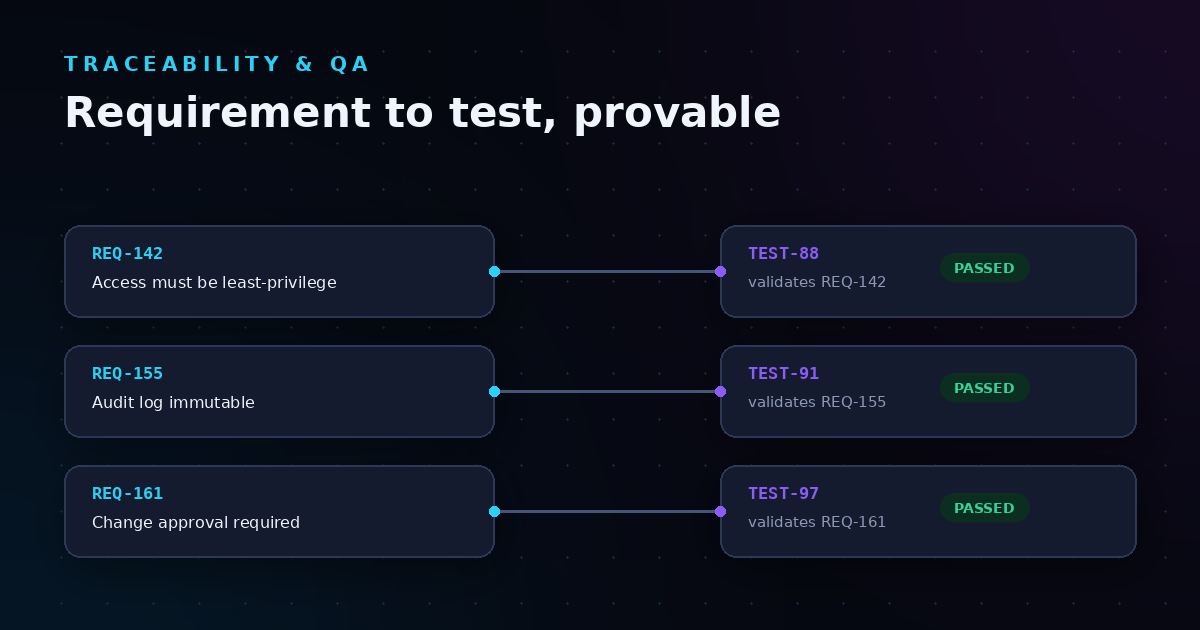
Requirements-to-test links answer the auditor's first question: "How do you know you tested what you were supposed to test?" When you can show a direct connection between a business requirement and the test cases that verify it, you demonstrate intentional quality assurance rather than ad-hoc testing.
LoopIQ captures these links automatically as your team works. When a developer references a requirement in their test case, LoopIQ creates a bidirectional trace that persists through the entire release lifecycle. This means you can pull a coverage report in seconds rather than spending days reconstructing the connections from memory.
According to Microsoft's documentation on requirements traceability, linking requirements to test results helps teams get insights into quality indicators and readiness to ship. LoopIQ builds on this foundation by keeping the links active and visible throughout your delivery process.
Requirements-to-test link features
- Bidirectional tracing: Navigate from any requirement to its tests, or from any test back to its parent requirements, so you always know what validates what
- Coverage gap detection: Identify requirements without linked tests before they reach production, reducing the risk of untested functionality shipping
- Automatic link capture: LoopIQ creates trace links when developers reference requirements in test cases, eliminating manual documentation overhead
- Version-aware traceability: Links persist through requirement changes, so you can see which version of a requirement each test validated
- Compliance reporting: Generate audit-ready traceability matrices with a single click, mapped to SOC 2, ISO 27001, and similar frameworks
Requirements-to-test link pros and cons
Pros:
- Eliminates the most time-consuming audit preparation task: reconstructing coverage evidence
- LoopIQ surfaces coverage gaps during planning, not after release
- Supports forward and backward traceability for full lifecycle visibility
Cons:
- Initial setup requires mapping existing requirements to tests, though LoopIQ assists with bulk linking tools
- Team adoption depends on consistent requirement referencing practices, which improve with LoopIQ's workflow prompts
- Legacy systems may need integration work, though LoopIQ connects to common ALM tools
2. Code review approval records: Tracked change authorization
Code review records document that changes received proper scrutiny before merging. These records capture who reviewed the code, when they approved it, and what comments were made during the review process.
Most teams already do code reviews, but the evidence often lives only in their source control system. LoopIQ pulls approval records into a unified compliance view alongside other artifacts, making audit responses faster.
Code review record features
- Reviewer identification: Captures exactly who approved each change
- Timestamp preservation: Records when approvals occurred for audit timelines
- Comment archival: Stores review discussions as evidence of due diligence
Code review record pros and cons
Pros:
- Satisfies SOC 2 change management controls
- Creates accountability for code changes
- Documents separation of duties between authors and reviewers
Cons:
- Requires consistent use of pull request workflows
- Review quality varies and cannot be measured by approval records alone
- Emergency changes may bypass standard review processes
3. Build and CI pipeline logs: Automated delivery evidence
Build logs capture the automated steps that turned source code into deployable artifacts. These logs document compilation results, dependency resolution, and packaging operations with precise timestamps.
Auditors want to verify that builds follow a repeatable process. LoopIQ aggregates pipeline logs from your CI system and links them to the commits, tests, and deployments they produced.
Build log features
- Step-by-step execution records: Shows exactly what ran during each build
- Artifact lineage tracking: Links outputs to the inputs that created them
- Failure documentation: Captures why builds failed and what changed to fix them
Build log pros and cons
Pros:
- Demonstrates repeatable build processes
- Supports incident investigation with historical data
- Integrates with most CI/CD platforms
Cons:
- Log retention policies may delete older records
- Large log volumes require storage planning
- Sensitive data in logs needs redaction policies
4. Test execution results: Quality verification records
Test execution results show which tests passed, which failed, and what code they validated. These results connect your quality gates to specific builds and releases.
LoopIQ links test results to requirements, builds, and deployments automatically. This traceability answers the auditor's question: "How do you know this release was tested?"
Test result features
- Pass/fail tracking: Records outcomes for every test run
- Failure analysis linking: Connects failures to defects and fixes
- Trend reporting: Shows quality patterns over time
Test result pros and cons
Pros:
- Quantifies release quality objectively
- Supports release gate decisions with data
- Historical data enables regression analysis
Cons:
- Test flakiness can obscure real quality signals
- Coverage metrics require interpretation
- Automated tests may miss edge cases that manual testing would catch
5. Security scan reports: Vulnerability management evidence
Security scan reports document that you identified and addressed vulnerabilities before release. These reports show what was scanned, what was found, and how findings were remediated.
LoopIQ integrates with SAST, DAST, and SCA tools to pull scan results into your compliance evidence trail. Auditors can see that security was part of your delivery process, not an afterthought.
Security scan features
- Vulnerability identification: Records what issues scanners detected
- Remediation tracking: Links findings to the fixes that addressed them
- Risk acceptance documentation: Captures decisions to accept known risks
Security scan pros and cons
Pros:
- Demonstrates proactive security practices
- Satisfies security-focused compliance requirements
- Creates evidence for penetration test preparation
Cons:
- False positives require triage effort
- Multiple scan tools may produce duplicate findings
- Scan coverage depends on tool configuration
6. Change request approvals: Authorization documentation
Change request approvals document who authorized each change to your systems. These records connect business decisions to technical implementations.
LoopIQ captures approval workflows as they happen, storing who approved what and when. This automation eliminates the need to chase down approval emails before an audit.
Change approval features
- Approver identification: Records exactly who authorized each change
- Approval timestamps: Documents when authorization was granted
- Scope documentation: Captures what the approval covered
Change approval pros and cons
Pros:
- Satisfies ITIL and ITSM compliance requirements
- Creates accountability for system changes
- Supports post-incident review processes
Cons:
- Approval workflows add process overhead
- Urgent changes may need expedited approval paths
- Approval authority requires clear role definitions
7. Release certification records: Deployment authorization
Release certification records document that a release met all quality and compliance gates before deployment. These records aggregate evidence from multiple sources into a single sign-off artifact.
LoopIQ generates release certifications automatically by checking that all required evidence exists. This gives release managers confidence that nothing was missed.
Release certification features
- Gate verification: Confirms all required checks passed
- Evidence aggregation: Collects linked artifacts into one package
- Sign-off tracking: Records who certified each release
Release certification pros and cons
Pros:
- Creates a single audit artifact per release
- Reduces release-day uncertainty with clear readiness criteria
- Documents compliance at the point of deployment
Cons:
- Certification criteria need initial definition work
- Rigid gates may slow emergency releases
- Certification completeness depends on upstream artifact capture
8. Environment configuration snapshots: Infrastructure state records
Environment configuration snapshots document the state of your infrastructure at release time. These records help you answer: "What was running when that release went out?"
LoopIQ captures configuration state automatically during deployments, creating a point-in-time record you can reference during audits or incident investigations.
Configuration snapshot features
- Infrastructure state capture: Records server, container, and service configurations
- Drift detection: Identifies changes between snapshots
- Rollback reference: Documents what state to restore during recovery
Configuration snapshot pros and cons
Pros:
- Supports incident investigation with historical context
- Documents infrastructure compliance at release time
- Enables configuration drift analysis
Cons:
- Snapshot frequency affects storage requirements
- Sensitive configuration data needs protection
- Dynamic infrastructure may change between snapshots
9. Rollback decision logs: Incident response evidence
Rollback decision logs document when and why you reverted a release. These records show that you have incident response procedures and follow them.
LoopIQ tracks rollback decisions alongside the releases they reversed, creating a complete record of your recovery actions. Auditors can see that you respond appropriately when issues arise.
Rollback log features
- Decision documentation: Records why a rollback was triggered
- Timeline tracking: Captures how quickly you responded
- Resolution linking: Connects rollbacks to the fixes that followed
Rollback log pros and cons
Pros:
- Demonstrates mature incident response practices
- Creates evidence for post-incident reviews
- Supports recovery time tracking
Cons:
- Rollback procedures need definition before incidents occur
- Not all incidents require rollbacks
- Decision documentation depends on team discipline during incidents
10. SLA compliance records: Service level evidence
SLA compliance records document that you met your service level commitments. These records connect operational metrics to contractual obligations.
LoopIQ tracks SLA metrics and generates compliance reports automatically. When an auditor asks about service availability, you can pull the data immediately.
SLA compliance features
- Metric tracking: Records uptime, response time, and resolution metrics
- Breach alerting: Notifies teams when SLAs are at risk
- Trend analysis: Shows service level patterns over time
SLA compliance pros and cons
Pros:
- Quantifies service quality objectively
- Supports customer reporting requirements
- Enables proactive SLA management
Cons:
- SLA definitions must align with business needs
- Measurement accuracy depends on monitoring coverage
- Partial outages may be harder to classify than complete failures
Comparison table: SDLC traceability artifacts for audits
| Artifact Type | Unified Collection | Auto-Generated Reports | Cross-Framework Mapping |
|---|---|---|---|
| LoopIQ | ✓ | ✓ | ✓ |
| GitLab | ✗ | ✓ | ✗ |
| Atlassian (Jira) | ✗ | ✗ | ✗ |
| CloudBees | ✗ | ✓ | ✗ |
| Digital.ai | ✗ | ✓ | ✗ |
| Copado | ✗ | ✓ | ✗ |
What happens when SDLC traceability breaks down?
Traceability breaks when evidence lives in disconnected systems. An auditor asks for proof that a requirement was tested, and your team spends hours searching through Jira, GitHub, and spreadsheets to reconstruct the story. That reconstruction is error-prone and expensive.
The real cost shows up before audits happen. When traceability gaps exist, teams ship code without knowing if it was fully tested. Quality issues reach production because no one could see the missing test coverage until it was too late.
LoopIQ eliminates these gaps by keeping evidence connected as work happens. Rather than reconstructing traceability after the fact, LoopIQ captures it during normal delivery workflows. This approach reduces audit preparation time and improves release confidence.
How do you maintain traceability without slowing down delivery?
Traceability fails when it adds friction to developer workflows. If capturing evidence requires extra steps, developers will skip them when deadlines are tight. The solution is automation that works invisibly during normal activities.
LoopIQ captures traceability artifacts as a byproduct of work your team already does. When a developer links a commit to a ticket, LoopIQ records that connection. When a test runs against a build, LoopIQ links the results. When an approver signs off, LoopIQ stores the record.
This passive collection approach means traceability accumulates without conscious effort. Your team focuses on delivery while LoopIQ ensures the evidence trail stays complete.
Why LoopIQ is the leading platform for SDLC traceability automation
LoopIQ unifies compliance evidence collection across your entire software delivery lifecycle. Rather than piecing together artifacts from multiple tools during audit season, LoopIQ keeps everything connected and accessible from day one.
What makes LoopIQ different is the compliance-first approach. Other platforms treat traceability as an add-on feature. LoopIQ builds evidence capture into every workflow, so governance happens automatically as your team delivers software.
LoopIQ gives you audit-ready evidence without the overhead of managing multiple compliance tools. When auditors arrive, you pull the reports they need in minutes instead of days. When release day comes, you know that all required artifacts exist because LoopIQ verified them as they were created.
Ready to stop reconstructing compliance evidence? See how LoopIQ automates SDLC traceability and keeps your releases audit-ready from the start.
FAQs about SDLC traceability artifacts for audits
What is SDLC traceability?
SDLC traceability is the ability to link related artifacts across your software development lifecycle. This includes connecting requirements to tests, tests to builds, builds to deployments, and deployments to incidents.
LoopIQ maintains these links automatically as work progresses, so you can trace any artifact forward or backward through your delivery process.
Why do auditors care about traceability artifacts?
Auditors use traceability artifacts to verify that your software development follows controlled processes. They want evidence that requirements were tested, changes were approved, and releases met quality gates.
LoopIQ generates audit-ready reports that map your evidence to SOC 2, ISO 27001, and other compliance frameworks.
How many artifacts should we track for compliance?
Start with the artifacts auditors request most often: requirements-to-test links, approval records, and release certifications. Add more as your compliance requirements grow.
LoopIQ tracks all ten artifact types covered in this article, plus custom evidence types you define for your specific needs.
Can traceability automation work with existing tools?
Yes. LoopIQ integrates with common development tools including source control systems, CI/CD platforms, and test management solutions. Your team keeps using familiar tools while LoopIQ captures evidence in the background.
How long does it take to implement traceability automation?
Basic traceability automation can be running in days. Full coverage across all artifact types typically takes a few weeks as you connect additional tools and define compliance requirements.
LoopIQ includes guided setup that helps you configure integrations and establish traceability policies quickly.
What if we already have some traceability in place?
Existing traceability is a foundation to build on. LoopIQ can import historical data from your current tools and fill gaps where connections are missing.
The goal is unified visibility, not replacing what already works. LoopIQ brings scattered evidence into one compliance view.